Understanding "Gaming in Progress" SVG Files: From Download to Creation
If you've ever seen a playful, bold sign declaring "Gaming in Progress - Don't Talk to Me" in a home office or gaming den, you've encountered a popular piece of modern digital decor. This isn't just a phrase; it's a culture, a statement, and increasingly, a customizable craft project. The journey from that idea to a physical decal or T-shirt often begins with a digital file—specifically, an SVG. For creators, hobbyists, and gamers alike, understanding what these files are, how they work, and their practical use is key to unlocking a world of personalized projects.
What Exactly is an SVG File?
Let's start from the ground up. SVG stands for Scalable Vector Graphic. Unlike the common JPEG or PNG photos you take with your phone, which are made of fixed pixels, an SVG is a mathematical marvel. It defines images using points, lines, curves, and shapes based on coordinates. This means an SVG image can be scaled up to the size of a billboard or down to a tiny sticker without any loss of quality or sharpness. The edges remain crisp, the text stays clean. This scalability makes it the gold standard for design work that needs to adapt to various sizes, from intricate vinyl cuts to large poster prints.
The Anatomy of a Crafting File Package: SVG, DXF, EPS, PDF, PNG
When you purchase or download a design like "Gaming in Progress," you typically receive a .zip folder containing multiple file formats. This isn't redundancy; it's thoughtful utility. Each format serves a different purpose in the creative pipeline:
- SVG: The primary, versatile vector file. Ideal for cutting machines (like Cricut and Silhouette) and many modern design software applications. It often contains layered, editable information.
- DXF: (Drawing Exchange Format) A vector format specifically cherished by older versions of some cutting software and certain CAD programs. It ensures compatibility across a wider range of hardware and software generations.
- EPS: (Encapsulated PostScript) A legacy vector format that is widely accepted by professional graphic design software like Adobe Illustrator. It's excellent for high-end printing and further graphic manipulation.
- PDF: (Portable Document Format) A reliable, universal container. It preserves the vector quality for easy viewing and printing on standard printers, perfect for creating quick reference sheets or non-cut projects.
- PNG: (Portable Network Graphics) A raster, or pixel-based, file with a transparent background. This is used for digital purposes—placing the design on websites, mock-ups, or using in simple software that doesn't support vectors.
The key first step, as noted in download instructions, is to extract this .zip folder to access these individual files. Compressed zip files reduce download size and keep the package organized, but your software cannot read them until they are unzipped.
The Specialized Purpose: Cutting Machine Magic
Files like the "Gaming in Progress" SVG are specifically made for cutting machines such as Cricut and Silhouette. This is their core significance. These machines are essentially smart, precision plotters with blades or pens. They read the paths and shapes outlined in the vector file (SVG or DXF) and translate them into physical motion, cutting those exact shapes out of materials like vinyl, cardstock, iron-on transfer material, or even thin wood.
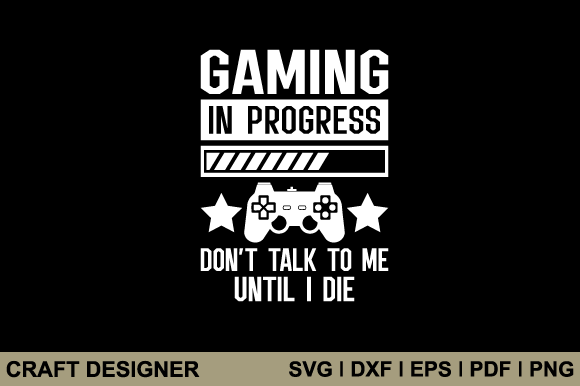
Imagine the phrase "Gaming in Progress - Don't Talk to Me." In an SVG, the letters aren't just a block of pixels; each letter's outline is a defined path. The machine follows this path with a tiny blade, perfectly cutting out the letters from a sheet of red vinyl. You then "weed" (remove) the excess vinyl around the letters, apply transfer tape, and stick the perfect phrase onto your laptop, game console, or a wall. This process turns a digital idea into a tactile, personalized object.
Practical Relevance in Modern Life and Culture
This intersects with several aspects of contemporary life:
- Personal Expression & Gaming Culture: Gaming is a major hobby and profession. This SVG allows individuals to carve out and signal their focus space—a humorous but clear boundary for family or roommates. It’s a badge of identity.
- The DIY & Maker Movement: It empowers people to create custom decor, apparel, and gifts without mass-production aesthetics. It supports small businesses, from Etsy sellers to local craft fairs.
- Technology Literacy: Engaging with SVGs introduces users to fundamental concepts of digital design, file management, and hardware interaction (the cutting machine), blending creativity with technical skill.
- Creative Education: Teachers and parents use these projects to teach planning, sequencing, and hands-on crafting. A simple SVG project can demonstrate design-to-production workflows.
Clarifying Common Misunderstandings
Several assumptions can trip up beginners. Let's clarify:
- "I can just use the PNG for my Cricut." Not optimally. PNGs are pixel-based. The machine software must trace the blurred edges of pixels, creating imperfect cut lines. The SVG provides a clean, direct path for a perfect cut.
- "All SVG files are ready to cut immediately." Often, they are, but sometimes minor adjustments in your machine's software (like grouping or attaching letters) are needed to ensure it cuts as a cohesive phrase, not scattered individual letters.
- "This is only for vinyl decals." Far from it. The same file can cut iron-on for T-shirts, engrave on acrylic, draw with a pen on cards, or be printed as a poster. The material choice unlocks different applications.
Building a Broader Understanding: The Ecosystem of Digital Crafting
Seeing the "Gaming in Progress" SVG not just as a file, but as a component in a system expands your capability. This system includes:
1. Design Creation: Artists create the original vector artwork. They consider factors like line thickness (so it cuts cleanly) and color separation (for layered projects).
2. File Distribution: The multi-format package ensures access regardless of the user's software or machine model, embodying the principle of universal accessibility in digital crafting.
3. User Software: Programs like Cricut Design Space or Silhouette Studio act as the bridge. Here, you import the SVG, resize it, choose materials, and send the digital instructions to the machine.
4. Physical Hardware: The cutting machine executes the plan. Its precision transforms the abstract vectors into a concrete object.
5. Finishing Techniques: The user's skill in weeding, transferring, applying, and finishing brings the project to life. This is where the human touch meets digital precision.
Examples in Action: From File to Finished Project
Consider a natural example: Alice, a gaming enthusiast, downloads the "Gaming in Progress" zip file. She extracts it and opens the SVG in Cricut Design Space. She places it on a digital canvas representing a sheet of 12" x 12" dark blue vinyl. After sizing it to 10 inches wide, she clicks "Make." Her Cricut machine loads the blue vinyl sheet, and with a quiet hum, its blade meticulously traces every letter and the gaming controller graphic. Minutes later, she peels away the excess vinyl (weeding), applies transfer tape to the intact design, and carefully positions it on the side of her gaming PC tower. The result: a professional-looking, custom decal that perfectly expresses her focused gaming sessions.
Another user, Ben, might use the same SVG's DXF file in his older Silhouette software to cut the design from white iron-on material. He then presses it onto a black hoodie, creating a personalized garment. The same core digital asset facilitates wildly different physical outcomes.
The Significance: More Than Just a Funny Sign
Ultimately, the "Gaming in Progress - Don't Talk to Me" SVG file represents a nexus of technology, culture, and personalization. It signifies how digital tools have democratized creation. No longer do you need a professional sign-maker or a bulk order from a custom apparel site. With an affordable machine and a well-structured digital file, you can produce unique, high-quality items that resonate with your identity or business brand.
It fits into the modern ethos of on-demand, meaningful production. Whether for work (creating branded office decor), education (visual aids), or daily life (personalizing your space), these files are tiny keys to a larger kingdom of making. By understanding the journey from the downloaded zip folder to the final, physical creation, you unlock not just a single project, but a methodology for bringing any digital idea into your tangible world.
So, the next time you see that "Gaming in Progress" sign, appreciate it not only for its message but for the craft, technology, and accessible creativity it represents. It's a testament to how a simple, scalable vector graphic can become a vibrant part of our modern, hands-on digital life.