Gaming Panels and Overlays: Professional Design Resources for Streamers
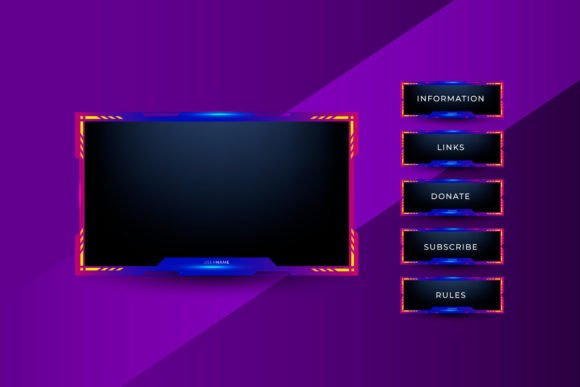
For anyone looking to elevate the visual quality of their streaming channel, the world of Gaming Panels and Overlays represents a significant resource. These are pre-designed graphical packages that provide a cohesive aesthetic framework for a stream. The term "panels" typically refers to the static informational graphics used on a channel's page, below the video feed—areas for detailing your schedule, outlining rules, or listing social links. "Overlays" are the dynamic graphics that appear live during the broadcast, framing the game screen, displaying alerts for new followers or subscribers, and integrating elements like a facecam border. The distinct advantage of a unified Gaming Panels and Overlays set is that it offers a complete, professionally curated visual identity, saving streamers from the often complex task of designing each element separately while ensuring a consistent look.
Understanding the Core Components of a Stream Design Package
To evaluate whether a Gaming Panels and Overlays bundle is right for your channel, it’s helpful to break down what these packages usually include and how each component functions. A comprehensive set addresses both the static branding and the live broadcast environment.
Informational Panels for Channel Pages
These are the cornerstone of your channel’s offline presentation. Common panel categories include About Me, Streaming Schedule, Donations/Support, Rules, and PC Specs. Good Gaming Panels and Overlays sets provide tailored graphics for each, with consistent typography, color schemes, and iconography. This creates an immediate sense of professionalism and organization for visitors browsing your page. Compared to creating simple text panels or using mismatched images, a unified panel set communicates that you are serious about your channel’s presentation.
Live Streaming Overlays and Alerts
This is where the package directly impacts the viewer's experience during the broadcast. The main game overlay often consists of a decorative frame around the gameplay footage, sometimes with integrated sections for sponsor logos or event information. More critically, it includes the system for alerts and buttons. Alerts are the visual (and often auditory) notifications that pop up when a viewer follows, subscribes, or donates. A well-designed alert within a Gaming Panels and Overlays package is animated and themed to match the overall design, making these viewer interactions feel special and integrated into the stream's theme. The "buttons" refer to interactive elements within software like OBS or Streamlabs, though the package itself provides the visual assets for them.
Integrating the Twitch Facecam
A key consideration for many streamers is how the package handles the Twitch facecam. Most bundles include a facecam frame or border that seamlessly integrates with the main overlay. This frame might be a simple decorated rectangle or a more complex shape that fits a specific theme (like a sci-fi console or a fantasy window). The goal is to make the camera feed look like a deliberate part of the design, not just a floating box on the screen. High-quality Gaming Panels and Overlays sets offer flexibility here, providing options for different camera placements and sizes to suit various streaming layouts.
Evaluating Gaming Panels and Overlays Against Other Approaches
Streamers have several paths to obtaining their channel graphics, and understanding the tradeoffs between them is essential. Purchasing a Gaming Panels and Overlays package sits between two primary alternatives: fully custom commission and free or DIY solutions.
Commissioning a designer for a completely unique overlay and panel set offers maximum personalization. You control every detail, ensuring a perfect fit for your brand. However, this approach is often the most expensive and time-consuming, requiring clear communication with a designer and a potentially lengthy development process. For established streamers with a strong, unique brand identity, this can be the ideal route. For newer streamers or those prioritizing a professional look with a faster setup, a pre-made Gaming Panels and Overlays bundle offers a compelling middle ground.
On the other end of the spectrum are free templates, basic DIY tools, or creating graphics yourself with software like Photoshop or Canva. The advantage here is cost—often zero—and complete creative control if you have the skills. The tradeoff is time and quality. Achieving a cohesive, polished, professional look across panels, overlays, alerts, and the Twitch facecam integration requires significant design expertise and effort. A pre-made Gaming Panels and Overlays package delivers that polished cohesion immediately, as it is crafted by professional graphic designers with an understanding of streaming aesthetics and technical requirements.
Key Decision Factors for Choosing a Design Package
When considering a Gaming Panels and Overlays set, several practical factors will determine if it’s a good fit for your situation. Assessing these will help you avoid a mismatch between the product’s offerings and your channel’s needs.
Theme Cohesion and Audience Appeal
The thematic style of the package is paramount. Does its aesthetic—be it minimalist, cyberpunk, fantasy, vibrant, or dark—align with the games you play and the community you're building? A horror-themed overlay would feel disjointed on a cheerful family-friendly channel. Good Gaming Panels and Overlays collections are built around a strong, consistent theme that extends from the panels to every alert animation and the Twitch facecam frame. This cohesion directly impacts audience perception and can strengthen your channel’s identity.
Technical Compatibility and Customizability
Even within pre-made packages, there is variation in flexibility. Some Gaming Panels and Overlays sets are provided as static image files (PNG/PSD) that you place manually in your broadcasting software. Others might include files formatted for specific platforms like Streamlabs OBS, with pre-configured layers for easy editing of text colors or minor elements. Consider your own technical comfort level. If you need to slightly adjust colors to match your personal logo, does the package allow for that? Also, verify that the included assets cover all the alert types you plan to use (e.g., follows, subscriptions, donations, raids).
Scalability and Long-Term Use
Think about the longevity of the design. Will this Gaming Panels and Overlays set still feel appropriate if your channel grows or shifts content focus slightly? Some highly themed designs might feel restrictive over time, while more versatile, clean designs can adapt better. Additionally, check if the package includes variations or extras, like different versions for special events or holiday streams, which can add value and extend its usefulness.
When Gaming Panels and Overlays Is the Right Choice
This approach is particularly well-suited for specific scenarios. If you are a streamer who values a professional, polished on-screen presentation but lacks the time, budget, or design skills to create a fully custom suite from scratch, a Gaming Panels and Overlays package is an efficient solution. It allows you to launch or revamp your channel with a high-quality look quickly. It’s also ideal for streamers who have a clear thematic niche—like retro gaming, competitive esports, or a specific game franchise—and can find a package that perfectly encapsulates that vibe.
Furthermore, for those focusing on building a community, the integrated alerts and buttons system is a major benefit. Viewer interactions become visually rewarding events that reinforce the channel’s theme, potentially enhancing engagement. The seamless integration of the Twitch facecam also ensures your presentation looks intentional and tidy, which is important for streamers who prioritize their on-camera presence.
Recognizing When Another Option Might Be Necessary
Despite their advantages, Gaming Panels and Overlays bundles aren't a universal solution. If your channel brand is built around a very unique, specific visual identity that doesn’t align with any available pre-made themes, you may find these packages limiting. For instance, a streamer with a highly personalized mascot or logo that must be the central design element might struggle to integrate it into a fixed template without compromising cohesion.
Similarly, streamers with extremely complex technical setups—such as those using multiple game scenes, special effect transitions, or highly customized interactive elements—might require a more bespoke design approach. The pre-configured layers in some packages might not accommodate these advanced needs. In these cases, the investment in a custom commission or dedicating time to a sophisticated DIY project could be more appropriate.
Budget is another consideration. While Gaming Panels and Overlays packages are generally affordable compared to full custom work, some free templates or low-cost basic tools might be the only viable path for streamers just starting out with minimal funds. The tradeoff, as discussed, is in the time investment and final polish.
Making an Informed Decision for Your Channel
The choice ultimately hinges on balancing your priorities: visual quality, time, budget, brand uniqueness, and technical needs. A well-selected Gaming Panels and Overlays set can dramatically improve your channel's professionalism and thematic strength without a large investment of time or money. It provides a complete system, ensuring your panels, your live overlay, your alerts and buttons, and your Twitch facecam all work together harmoniously.
Before deciding, it’s practical to review examples of the package in use, often provided by the designer as demo videos or screenshots. Imagine it applied to your content. Does it enhance or distract? Does it feel like a natural extension of your streaming persona? By focusing on the cohesion of the theme, the completeness of the components, and the flexibility for your specific needs, you can determine if a Gaming Panels and Overlays bundle is the right tool to achieve the streamlined, engaging broadcast environment you’re aiming for.